Generally, the entire railway line
is divided into several sections,
and each section is fi nished separately.
Firstly, we need to collect the existing
information of one section, such as
map and control points. Then, survey
the topography of the working area,
select position of control points, set the
control point network, and produce the
control points by GPS static survey.
After control points are surveyed, we
need to get the aero photograph of
working area, draw 1:2000 relief map -
to provide base data for railway designer.
Besides the survey of control
points, there are several steps
that need the RTK system.
• There is no coordinate information
in aero photograph. In order to
add coordinates to features after
vectorization, photo-control points
are needed to induct coordinates.
• There is not enough information in
relief maps that are vectorised from
aero photograph, such as the direction
of underground drain and feature
details, for these supplementary
survey in the fi eld is needed.
• In order to survey the soil quality
along the railway, drilling sites
for geological sampling should
be selected and surveyed.
• The distribution and height of
existing railway should be surveyed.
• Pile stakeout should be done,
which means to layout the
designed railway coordinates to
actual position in the field.
• Transect which reflects the
topographic changes along the
railway should be surveyed.
The entire flow of railway design
can be depicted in a fl ow chart as:
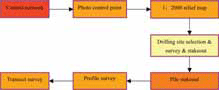
Figure 1: Work flow
Control point
According to the survey principle of
'Overall fi rst, parts second, control
fi rst, detail second', fi rst the survey
work for control poin ts is done. After
the designer has collected the existing
information of one section, such as
maps and control points, he will survey
the topography of the working area,
select position of control points, set the
control point network, and produce the
control points by GPS static survey.
In this process, RTK system is used to
collect static raw data for post-processing.
As the RTK system records dual frequency
raw data, the post-processing accuracy is
higher than single frequency GPS receiver.
The data format is 'RINEX' which is
compatible with other survey systems and
makes the work much more convenient and efficient.
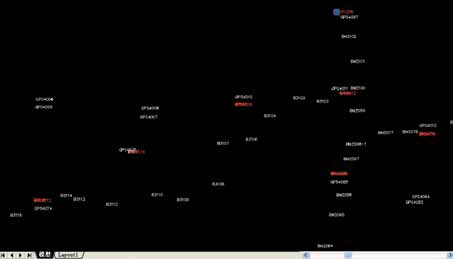
Figure 2: Control Network, a pair of GPS control points every 8 km and one bench mark every 2 km
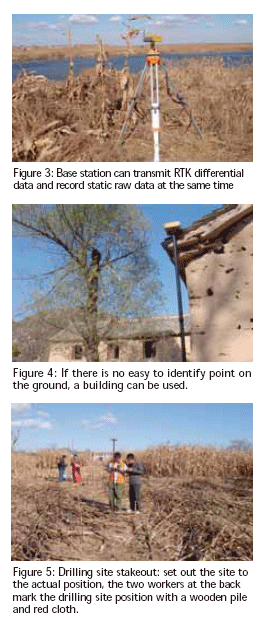

Photo control
point
Photo control
point is a kind
of control point
that is used to
calibrate the aero photograph. In railway
design, aero photograph is used to generate
1:2000 relief map by vectorization. In
order to add coordinates to features after
vectorization, photo-control points are
needed to induct coordinates. Generally,
some feature points that are easy to identify
are picked as photo control points, and
then the points are surveyed in the fi eld.
In actual fi eld work, since aero photograph
with a scale of 1:10000 is used the features
in the photograph are not exactly as the
actual objects and sub-meter accuracy of
photo control points is enough. Besides, the
photo control points are distributed widely.
So working with GPRS communication
mode is advisable for long distance RTK
survey. In this mode, the working distance
is longer (up to 20~30km). Additionally,
base station can record raw static data
simultaneously while transmitting
differential data. If there is no GPRS signal
or bad GPRS signal in some regions, the
working mode can be turned to 'fast static'
(static survey every 15 minutes). Thus, the
results can be obtained by post-processing.
The two kinds of working modes ensure
the fi eld work is smooth and at no risk.
Supplement features and
existing railway line
As the required relief map with a
scale of 1:2000 is more detailed than
the aero photograph with the scale of
1:10000, the relief map converted from
aero photograph will lack some of the
detailed information about features. This
information should be supplemented by
surveying in the fi eld. Existing railway line
information in working area is a kind of
the supplementary information required.
The points for supplement information and
existing railway line can be surveyed with
the function of 'point survey'. In some
places that are not covered in detail, the
points can be obtained by 'offset survey'.
With the 'Railway-design' software, we
can add attributes to the points. Adding a
specifi c code to each kind of object, the
points can be joined automatically into a
graph according to the code after the fi le
is imported into AUTOCAD program.
Drilling site
'Drilling site' is used for geological
sampling to gain information
about the geological conditions
along the railway line.
There are three steps which have to
be followed at the drilling site.
. Select the drilling site: according to
the designed coordinates of railway,
select points on the central line of
the railway as the drilling sites.
Designers select the sites in the fi eld,
mark them with wooden piles and
record the positions with handheld
GPS receiver. These positions are
used for navigation in the future.
. Survey the drilling site: survey the
coordinates of selected drilling sites.
3D coordinates are required and
accuracy should be within 50cm.
. Drilling site stakeout: according
to the coordinates designed,
fi nd the sites in the field.
As the required accuracy of drilling site
survey and stakeout is not high and the
distribution of sites is wide, therefore the
combination of GPRS communication
mode and fast static survey mode
is also ideal for these two steps.
Pile stakeout and profile survey
Pile: set a pile every N meters along the
railway line, to control the direction of
railway.
Profile: vertical section that cuts along the
center line.
Pile mileage: the distance between the pile
and the start point of line.
Offset: the distance between
projection point of RTK instruments
and the center line of railway.
Based on the coordinates of intersection,
mileage of intersection, easement curve
length, circular curve length and distance
between piles, the mileage and coordinates
of piles can be calculated. Then the piles
can be set out in the fi eld with the stakeout
function of railway-stakeout software.
There are two ways to stakeout:
• Coordinates stakeout: according to
the coordinates of pile, the software
will prompt the setover from
current position to pile position.
• Mileage stakeout: setover of ‘0’
means current position is on the
center line of the railway. Go forward
or back along the center line, when
the mileage shows the same as the
calculated mileage of the pile, current
position is the right position.
Survey profi le: along the center line of
railway, survey the topographic points
(such as ridge, wire, and canal).
Using RTK system
in this process
The design of railway is quite simple and
fast. Railway-design software is quite
advanced when designing a railway. For
example to design a 40km long railway
line, we only need the coordinates of
intersection, distance between points
of intersection, easement curve length,
circular curve length and pile mileage. The
main work is to arrange these elements
in certain order and build a road fi le,
and could be fi nished in 2 minutes.
User-defi ned feature function. The function
of user-defi ned features makes the inside
and outside work much simpler. When
surveying the profi le, if there is some
topography point (such as the scarp), one
needs to record the name and attributes of
this point in a notebook, and then input this
points details into the computer once back
in the offi ce. But, with Railway-design
software, the engineer can input attributes
directly in the fi eld and save time.
Transect
Transect refl ects the topography
situation on both sides of the railway.
After confi rming the position of
a pile, measure the topographic
points along the transect direction
to record the transect condition.
There are many advantages of using RTK.
Graphic is intuitionistic: when
measuring transect, the departure
distance from midline can be seen | 